
How to Turn One Idea Into 10 Pieces of Content: The Repurposing System for Busy Business Owners
May 17, 2026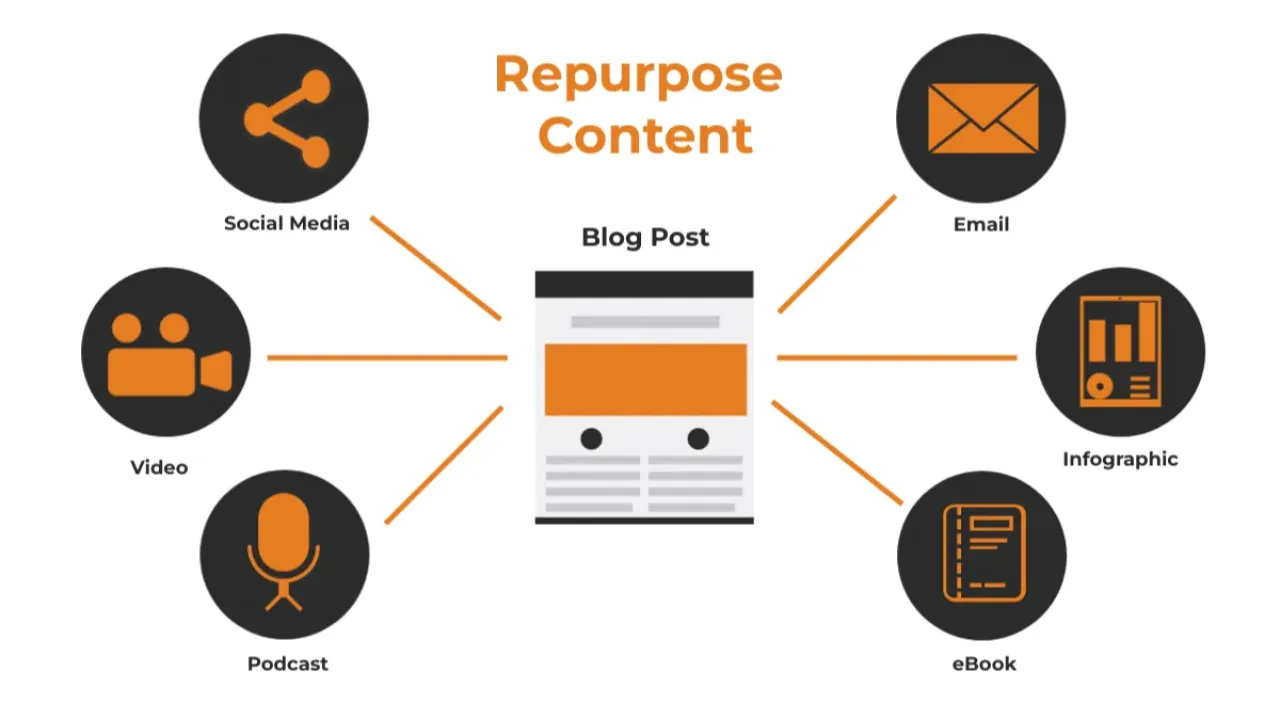
Last updated: April 2026 · Written by 20 Minute Marketing · 9 min read
One of the biggest myths in content marketing is that you need a constant stream of brand-new ideas to stay visible online. The truth? You don't need more ideas. You need a better system for using the ideas you already have.
Content repurposing is the practice of taking a single piece of content and transforming it into multiple formats for different platforms. One blog post can become a week's worth of social media content, an email newsletter, a short video, and more — without starting from scratch each time.
For small business owners who are already stretched thin, this isn't just a time-saver. It's a game-changer. In this guide, we'll walk you through a simple repurposing system that turns one idea into 10 or more pieces of content — in about 20 minutes.
Why Content Repurposing Works
📘 Want the full picture? Read our our practical marketing guide — the complete pillar guide this article is part of.
Before we get into the how, let's talk about why repurposing is so effective.
1. Your audience doesn't see everything. Only a fraction of your followers see any given post. By sharing the same core message in different formats and on different platforms, you reach more people without being repetitive.
2. Repetition builds trust. Marketing research consistently shows that people need to encounter a message multiple times before they take action. Repurposing helps you reinforce your key ideas without feeling like a broken record.
3. Different people prefer different formats. Some people love reading blog posts. Others prefer scrolling Instagram. Some watch videos. Repurposing lets you meet your audience wherever they are, in the format they prefer.
4. It saves you massive amounts of time. Creating one piece of content from scratch might take an hour or more. Repurposing that content into five more formats? That can take 20 minutes total.
The Content Repurposing System: Start With a Pillar
The foundation of this system is what we call a "pillar" piece of content. This is a longer, more detailed piece that covers a topic thoroughly. A blog post, a podcast episode, a video tutorial, or even a workshop recording can serve as your pillar.
For most small businesses, a blog post is the easiest pillar to create. It's written, it's searchable on Google, and it's easy to break apart into smaller pieces.
Here's the rule: create one pillar piece of content per week (or per fortnight, if that's more realistic). Then use the repurposing system below to turn it into 10 or more additional pieces.
One Blog Post → 10 Pieces of Content
Let's say you've written a blog post. Here's exactly how to turn it into 10 pieces of content:
1. The Blog Post Itself
This is your pillar. Publish it on your website, optimised for SEO. This is the piece that will drive long-term organic traffic from Google.
2. An Email Newsletter
Write a short email to your list summarising the key takeaway from the blog post. Include a link to the full article. You don't need to rewrite the whole thing — just share the main insight and invite them to read more.
3. A LinkedIn Post
Take the most interesting point from the blog and turn it into a standalone LinkedIn post. Use a hook to grab attention, share the insight, and end with a question or call to action. Keep it to 150–300 words.
4. An Instagram Carousel
Pull out 5–7 key points from the blog post and turn them into a carousel. Each slide should have one short, punchy statement. Use the last slide as a call to action (e.g., "Save this for later" or "Link in bio for the full guide").
5. A Facebook Post
Write a conversational version of the blog's main takeaway. Facebook works best when the tone is personal and relatable. Share a quick story or observation, then link to the blog.
6. An Instagram Story (or Series)
Create 3–5 story slides that walk through the blog's key points. Use text overlays, polls, or question stickers to boost engagement. You can even reshare your carousel post in your stories with a "New Post" sticker.
7. A Short-Form Video (Reel, TikTok, or YouTube Short)
Pick the single most valuable tip from the blog post and record a 30–60 second video explaining it. You don't need fancy equipment — your phone and natural light are enough. Speak directly to camera and keep it simple.
8. A Quote Graphic
Pull a strong sentence or statistic from the blog and turn it into a shareable quote graphic. Use a free tool like Canva to create a clean, branded image. Post it on Instagram, LinkedIn, or Facebook.
9. A Twitter/X Thread
Break the blog post down into a thread of 5–10 tweets. Start with a hook ("Here's something most small business owners get wrong about [topic]…"), share the key points, and end with a link to the full post.
10. A Pinterest Pin
Create a vertical graphic with the blog title and a compelling subtitle. Link it to the blog post. Pinterest is an underrated traffic driver for small businesses, especially for how-to and educational content.
The 20-Minute Repurposing Workflow
Here's how to repurpose a blog post into multiple pieces of content in about 20 minutes:
Minutes 1–5: Pull out key points. Read through your blog post and highlight 5–7 key insights, tips, or quotes. These will form the basis of your repurposed content.
Minutes 5–10: Write your email and LinkedIn post. Draft a short email summary (3–4 sentences + a link) and a LinkedIn post based on the strongest point. These two are the fastest to create.
Minutes 10–15: Create your visual content. Open Canva and create an Instagram carousel and a quote graphic using the key points from step one. Use a template you've already set up (this saves even more time).
Minutes 15–20: Draft your social posts. Write your Facebook post, a short caption for Instagram, and a tweet thread or X post. If you have time, jot down a 2–3 sentence script for a short video.
That's 10 pieces of content from one blog post, created in 20 minutes. You can schedule them throughout the week using a free tool like Buffer, Later, or Meta Business Suite.
Tips to Make Repurposing Even Easier
Batch your content. Don't try to create and repurpose content on the same day. Write your blog post one day, then repurpose the next. Batching keeps you focused and efficient.
Use templates. Set up Canva templates for your carousels, quote graphics, and Pinterest pins. Once they're designed, you just swap in the new text each week.
Keep a swipe file. When you see a format or post style that works well, save it. Having a reference library of formats makes it faster to create new content.
Repurpose your best performers. If a blog post or social post performs well, don't be afraid to repurpose it again a few months later. Update the content, change the format, and share it with a new audience.
Don't overthink it. Repurposed content doesn't need to be perfect. It just needs to be useful and consistent. Done is better than polished.
What If You Don't Have a Blog?
No problem. Your pillar content doesn't have to be a blog post. It can be:
A video you recorded for YouTube or social media.
A podcast episode.
A workshop or presentation you delivered.
A FAQ you answered for a customer.
An email you wrote to your list.
The principle is the same: start with one substantial piece of content, then break it down into smaller formats for different platforms. The medium doesn't matter — the message does.
Final Thought
You don't need to create more content. You need to get more mileage from the content you're already creating. A simple repurposing system lets you stay visible across multiple platforms without burning out or spending hours at your desk every day.
Start with one blog post. Turn it into 10 pieces of content. And watch how much further your ideas can go.
Get the complete digital marketing system built for NZ small business.
Browse Essentials Modules →Ready to follow a guided class? step-by-step Digital Marketing Class.
Practical marketing, not theory.
20 Minute Marketing is the digital marketing course built for owners who need results, not lectures — short lessons, immediate actions, real outcomes.
Built for time-poor NZ small business owners.
Learn digital marketing in 20 minutes a day
Self-paced courses from someone who runs digital for two national brands. Build skills you can show an employer or a client.